
Overview
If you're here because your portfolio shows as private, you're in the right place, and making it public takes just one simple step. This article walks you through it and shows you how to check the result.
In short:
- Submit your portfolio using the Portfolio Submission Form.
- It's reviewed on the next Monday.
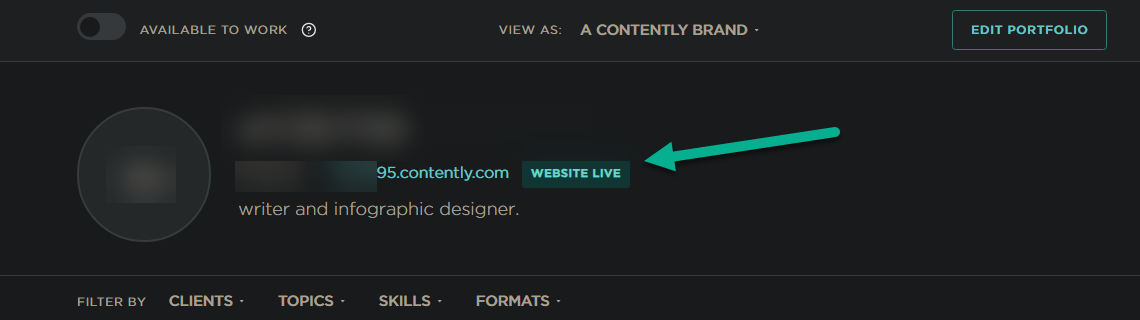
- On Monday, or Tuesday at the latest, check your portfolio page for "WEBSITE LIVE" badge, as seen below:
- If it isn't there, refine your portfolio and submit it again.
- Once your portfolio is live, complete the Contently freelancer training to learn how working with clients on Contently works.
Information
Every portfolio is reviewed before it goes public, so that clients can trust every portfolio they see on Contently. That trust benefits every approved freelancer. Your portfolio becomes public once it's approved in a review, and a review happens after you submit the Portfolio Submission Form.
What does this mean for your portfolio?
Here's what you need to know:
- Approval Process
- How do I know if I'm already approved?
- Re-submit for Approval for a Public Portfolio
Approval Process
To have your portfolio visible to the public, it needs to be approved by the Creative Marketplace team. Once it's approved, switch on "Available to Work" so clients know you're open to projects.
- You can submit your portfolio for approval at any time using the following form:
Note: If you are unable to access the link above due to regional or local restrictions, we will be unable to assist you with this issue. There is no alternative method to submit your portfolio. In cases where access to the link is restricted, you may need to use a VPN to bypass the restrictions and submit your portfolio through the designated channel. Please note that no exceptions to this policy will be made.
After you submit the form, the form itself shows a short message saying that your response has been submitted. That message is your confirmation that your submission was received; you don't need any other confirmation. The Creative Marketplace team reviews new submissions every Monday, and submissions received by the end of Sunday (UTC) are included in that Monday's review. No email is sent with the result, whether your portfolio is approved or not; your portfolio page is the only place to see it. To read it, see How do I know if I'm already approved? below.
Please know that only the Creative Marketplace team reviews and approves portfolios, so our support team can't change a portfolio's visibility.
You'll find helpful guidelines for your portfolio in this document. It's well worth a quick read before you submit.
How do I know if I'm already approved?
To see the result, sign in to your Contently account and open your portfolio page on Monday, or Tuesday at the latest. If you see "Website Live" next to your portfolio URL, congratulations: your portfolio is approved and public. You'll also notice that your portfolio URL is clickable and that the "Available to Work" and "View as" settings appear at the top of your portfolio.
Once your portfolio is live, your next step is the Contently freelancer training. Completing it is very important: it shows you how Contently connects freelancers with client projects and how working with clients on the platform works, so you're ready to make the most of every opportunity. The link opens a separate e-learning platform, so your Contently password won't work there. Simply sign up, or sign in quickly with one of the options offered, such as Google. Be sure to use the same email address as your Contently account, and if the course asks for an email address at the end, enter that same address. That's how your completion is linked to your Contently account.
If "Website Live" isn't shown by the Tuesday after the Monday review that followed your submission, your portfolio wasn't approved that time. You can submit it again whenever you're ready, as described in Re-submit for Approval for a Public Portfolio below.
While your portfolio isn't public, you won't see "Website Live". Most freelancers see a banner saying "Your portfolio is currently private", and some see a banner saying "You're awaiting approval from our Creative Marketplace Team" with a "Pending Approval" label. Both simply mean your portfolio isn't public yet. Neither means a review is scheduled: a review starts when you submit the Portfolio Submission Form.
Approval doesn't last forever: a portfolio that was approved or public in the past, including one approved under an earlier vetting process, can become private again. Keep your account active by signing in at least once every 6 months, as described in What is Contently's inactive user account policy?.
Re-submit for Approval for a Public Portfolio
If your portfolio is private, including if it was approved or public before, submit it for review using the Portfolio Submission Form in the Approval Process section above. A past approval doesn't by itself make a portfolio public again; every submission is reviewed under the current process. If your portfolio wasn't approved, just submit the form again. There's no limit and no deadline: you can submit every week, as many times as you like, and each submission gets a new review.
No reasons or individual feedback are given on any portfolio. A large number of portfolios are reviewed every week, and to keep reviews quick and fair for everyone, we don't send individual feedback; instead, you can resubmit as often as you like. Before you resubmit, use the portfolio stand-out tips to refine your portfolio; they're your guide to what helps a portfolio stand out.
While your portfolio is private, all your content stays safely in your account. You can see it when you're signed in to your own account, but no one else can, including other people signed in to Contently.
Sharing a private portfolio: Want to share your work in the meantime? While your portfolio is private, you can export it using the "Save as PDF" or similar option in your web browser and share it with your clients. Here are instructions on how to Export PDFs from Google Chrome.
Summary
Making your portfolio public is easy: submit the Portfolio Submission Form, then check your portfolio page on Monday, or Tuesday at the latest, for "Website Live". If it isn't there yet, refine your portfolio and submit again. You can submit as often as you like, and each submission gets a new review. We look forward to seeing your portfolio go live, and once it does, we recommend completing the freelancer training so you're ready to make the most of every opportunity!